


Magento Performance Problems: When Optimization Is No Longer Enough
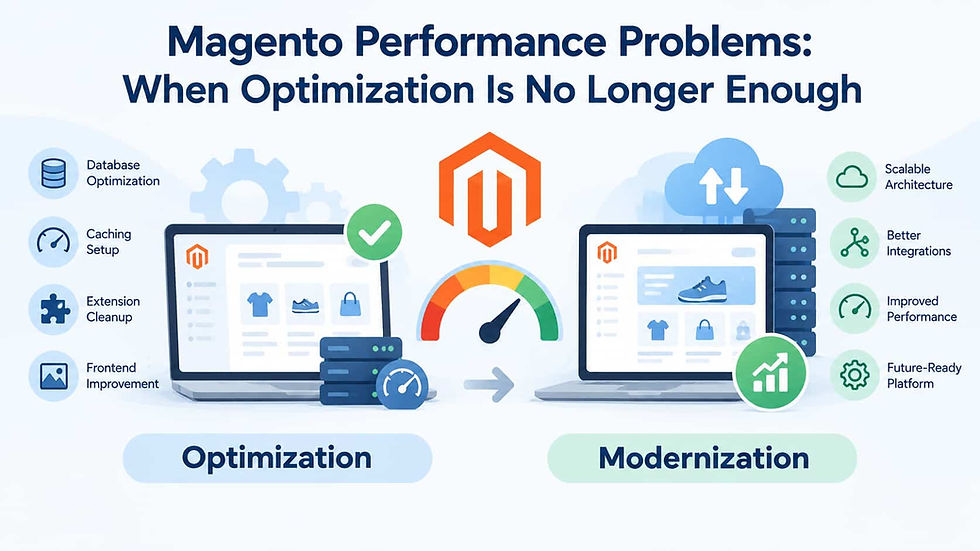
Magento stores can develop performance problems for many reasons. Slow database queries, oversized images, inefficient extensions, poor caching configuration, and inadequate hosting can all make an online store feel sluggish. Many of these issues can be fixed through targeted optimization.
But not every performance problem is an optimization problem.
As a Magento store grows, performance limitations may eventually come from its architecture rather than from individual components. At that point, repeatedly tuning caches, adding server resources, or optimizing isolated queries may provide only temporary improvements. Businesses need to determine whether they are dealing with fixable bottlenecks or a deeper architectural problem that requires modernization.
Start by Identifying the Real Performance Bottleneck
Before changing the architecture, businesses should establish what is actually making the store slow. Performance problems can appear similar to users while having completely different technical causes.
Common bottlenecks include:
Slow database queries
Poorly configured caching
Inefficient custom modules
Outdated third-party extensions
Large or unoptimized images
Excessive JavaScript and CSS
Slow API requests
Insufficient server resources
Inefficient cron jobs
Poorly optimized search functionality
Checkout processing delays
Monitoring tools and application profiling can help identify where time is being spent. Developers should examine server response times, database queries, PHP execution, API calls, cache behavior, and frontend loading separately.
This distinction is important because applying architectural changes to a problem caused by a single inefficient module can introduce unnecessary complexity and expense.
Performance Problems That Optimization Can Fix
Many Magento performance issues do not require a major transformation. Targeted optimization can produce substantial improvements when the underlying architecture is fundamentally sound.
Database optimization
Large product catalogs and order databases can create database bottlenecks. Slow queries, inefficient indexes, excessive data, and poorly designed custom functionality can all contribute to delays.
Database optimization, query improvements, indexing adjustments, and appropriate infrastructure can often resolve these problems.
Caching configuration
Magento depends heavily on caching to reduce repeated processing. Incorrect cache configuration, ineffective full-page caching, or infrastructure that prevents efficient cache use can significantly affect response times.
Reviewing and optimizing caching should therefore be among the first steps in a performance investigation.
Extension-related problems
A single extension can sometimes create disproportionate performance problems. An extension may execute unnecessary queries, load resources on pages where they are not needed, or perform expensive operations during checkout.
Replacing or reconfiguring the problematic extension may solve the issue without changing the rest of the application.
Frontend optimization
Customers experience performance through the browser as well as the server. Large images, excessive scripts, blocking resources, and inefficient frontend code can increase page-load times even when the Magento backend is performing adequately.
Image optimization, code splitting, asset reduction, lazy loading, CDN configuration, and frontend refactoring can often improve the customer experience considerably.
Signs That Optimization Is No Longer Enough
The more difficult question is determining when individual fixes are no longer addressing the underlying problem.
One major warning sign is recurring performance degradation. Developers optimize the store, performance improves temporarily, and then the same problems return as traffic, product volume, or functionality increases.
This can indicate that the system's architecture does not scale with the business.
Another warning sign is that performance improvements require increasingly invasive work. If every optimization involves modifying multiple custom modules, rewriting integrations, changing database structures, and introducing complex workarounds, the store may have accumulated too much technical debt.
At that point, the cost of optimization itself becomes an architectural indicator.
Evaluate Custom Code and Technical Debt
Custom development is not inherently bad. Magento stores often require custom functionality to support unique business processes.
The problem occurs when custom code becomes tightly coupled to the platform.
For example, a store may have custom checkout logic that depends on several extensions, an ERP integration that directly interacts with internal Magento processes, and custom modules that modify the same data during checkout.
Changing one component can then affect several others.
This type of architecture makes performance optimization difficult because developers cannot isolate individual bottlenecks easily. Improving one process may simply move the bottleneck somewhere else.
Technical debt should therefore be evaluated alongside performance metrics. If the store requires extensive knowledge of undocumented customizations and legacy dependencies just to make routine performance improvements, a deeper architectural review is justified.
Look at Scalability, Not Just Current Speed
A Magento store can perform well under current traffic and still have a serious scalability problem.
Businesses should ask what will happen when traffic doubles during a major campaign, the product catalog expands, more customers use mobile devices, or the company enters additional markets.
Scalability should be evaluated across several dimensions:
Number of products and attributes
Concurrent visitors
Order volume
Checkout activity
API traffic
Search requests
Number of storefronts
Background processing
Third-party integrations
Geographic expansion
If the architecture has enough flexibility to scale horizontally and distribute workloads, targeted optimization may remain appropriate.
If growth consistently causes the same components to become bottlenecks, the problem is likely architectural.
Infrastructure Can Mask Deeper Problems
Increasing server resources is sometimes a reasonable solution. More CPU, memory, faster storage, database resources, or better caching infrastructure can provide immediate improvements.
However, infrastructure should not be used indefinitely to compensate for inefficient application architecture.
For example, doubling server capacity may temporarily address slow response times caused by inefficient custom code. But if the business continues growing, infrastructure costs can increase much faster than revenue.
A useful question is whether additional infrastructure improves efficiency or simply postpones the same problem.
If every increase in traffic requires disproportionately more computing resources, the architecture may need to change.
Consider Integrations and External Services
Magento performance is not always controlled by Magento itself.
Payment gateways, ERP systems, CRMs, shipping providers, product information systems, search platforms, and other external services can introduce latency.
A checkout process that waits synchronously for several external API responses can become slow even when Magento's own code is optimized.
Modern architectures can separate critical customer-facing operations from background processing, introduce queues, and reduce unnecessary synchronous dependencies.
If integrations are deeply embedded throughout the application, however, restructuring them may require more than conventional performance tuning.
When Modernization Becomes the Better Option
There is no single performance metric that automatically means a store should be rebuilt. The decision should consider the pattern of problems and the cost of continuing with the existing architecture.
Modernizing Magento becomes more compelling when several of the following conditions appear together:
Performance problems repeatedly return after optimization.
Custom modules are tightly coupled and difficult to maintain.
Legacy extensions restrict upgrades and optimization.
Integrations create widespread dependencies.
Scaling requires disproportionately more infrastructure.
Developers rely on workarounds to improve basic functionality.
New business requirements conflict with the current architecture.
Maintenance costs continue increasing.
Releases require extensive regression testing.
Performance improvements in one area create problems elsewhere.
In these situations, modernization can involve more than improving server performance. It may include refactoring custom modules, replacing outdated extensions, redesigning integrations, introducing asynchronous processing, changing frontend architecture, improving deployment practices, or restructuring infrastructure.
The objective is not simply to make the existing store faster. It is to create an architecture that can remain performant as the business evolves.
Use a Phased Approach Instead of Rebuilding Everything
A deeper architectural problem does not necessarily mean that the entire Magento store needs to be replaced immediately.
A phased approach can reduce risk.
First, establish performance baselines and identify the most important bottlenecks. Then separate issues that can be solved quickly from structural problems that require longer-term work.
For example, a business might immediately optimize images and caching while simultaneously redesigning an inefficient checkout integration. Later, legacy modules can be replaced and infrastructure can be adjusted to support greater scalability.
This approach allows the company to improve current performance while gradually reducing technical debt.
It also makes modernization easier to justify because each architectural change can be connected to measurable performance or business outcomes.
Conclusion
Magento performance problems should not automatically lead to a complete rebuild. Many bottlenecks can be addressed through database optimization, caching, extension audits, frontend improvements, better infrastructure, and targeted code changes.
The critical question is whether these improvements produce sustainable results.
When performance problems repeatedly return, technical debt prevents effective optimization, integrations create excessive dependencies, and scaling becomes increasingly expensive, the underlying architecture may be the real problem.
A structured performance audit can help businesses determine where optimization ends and architectural modernization begins. By evaluating current bottlenecks alongside scalability, maintenance costs, technical debt, integrations, and future business requirements, Magento store owners can avoid spending indefinitely on temporary fixes and instead invest in a platform capable of supporting long-term growth.


Comments